



Pros
- Intel and Qualcomm CPUs offered
- Strong overall performance with long battery life
- Compact, thin and rigid design
- Top-notch keyboard, touchpad
Cons
- HP’s pricing fluctuates wildly so you may need to be patient before buying
- Sharp, polished edges are pointy and prone to scratches
- Limited ports
If I had $2,000 to spend on an everyday, do-it-all Windows laptop, HP’s flagship OmniBook Ultra 14 would be the pick. Specifically, the Qualcomm Snapdragon X2-based model. HP offers both Intel and Qualcomm options, and I tested both. With better overall performance and longer battery life, the Snapdragon X2 Elite model is the winner of the two, unless you know you’ll run into Windows-on-Arm compatibility issues. (Given the wide support, I’d wager most people won’t.)
I tested loaded versions of the OmniBook Ultra 14 with 64GB of RAM, a 2TB SSD, a 3K OLED and a price hovering near $3,000, depending on the size of the fluctuating HP discount on any given day. I’d keep the OLED upgrade, but most people don’t need that much RAM or storage. Scale those back, and you’ll end up in the sweet spot of the line with a price less than $2,000 if you time HP’s discount right. At this price, it unseats the Dell XPS 14 as my favorite MacBook Pro alternative.
The OmniBook Ultra 14 is thinner and lighter than either the XPS 14 or 14-inch MacBook Pro, and it has the best keyboard of the bunch. The build quality is equal to its Ultra name, and the overall design is head-turning. The bottom panel’s concave platform makes the laptop look even thinner than it is — and it’s already really thin! There’s little to complain about with the OmniBook Ultra 14 other than its sharp edges and limited ports. Plus, HP’s fickle pricing scheme may force you to wait and find the right time to strike.
HP OmniBook Ultra 14
| HP OmniBook Ultra 14 (Qualcomm) | HP OmniBook Ultra 14 (Intel) 14t-kd000 | |
|---|---|---|
| Price as reviewed | $3,430 (on sale for $2,730) | $3,550 (on sale for $3,050) |
| Display size/resolution | 14-inch 3K (2,880×1,800) OLED multitouch 120Hz | 14-inch 3K (2,880×1,800) OLED multitouch 120Hz |
| CPU | Qualcomm Snapdragon X2 Elite X2E-90-100 | Intel Core Ultra X9 388H |
| Memory | 64GB LPDDR5-9523 | 64GB LPDDR5-9600 |
| Graphics | Qualcomm Adreno X2-90 | Intel Arc B390 |
| Storage | 2TB SSD | 2TB SSD |
| Ports | 3x USB-C 40Gbps, combo audio | 3x USB-C 40Gbps, combo audio |
| Networking | Wi-Fi 7 and Bluetooth 5.4 | Wi-Fi 7 and Bluetooth 5.4 |
| Operating system | Windows 11 Pro 26H1 | Windows 11 Pro 26H1 |
| Weight | 2.82 lbs (1.28 kg) | 2.82 lbs (1.28 kg) |
The latest models of the OmniBook Ultra 14 have either an Intel Panther Lake CPU or a Qualcomm Snapdragon X2 series processor. The Snapdragon X2-based OmniBook Ultra 14 starts at $1,900, but I’ve seen it as low as $1,200 when HP’s sizable discount lands on it. This entry-level model has a Snapdragon X2 Plus X2P-64-100 chip, 16GB of RAM, a 512GB SSD and a 2K (1,920x,1,200-pixel) OLED touchscreen display.
My test system maxes out the CPU, memory and storage while also including the lone display upgrade. It has a Snapdragon X2 Elite X2E-90-100 chip, 64GB of RAM, a 2TB SSD and a 3K (2,880×1,800-pixel) OLED touchscreen display. These upgrades add to the cost significantly, raising the price to $3,430, though I’ve seen it on sale for as low as $2,730.
That’s a princely sum for a laptop with integrated graphics. Personally, I would be loath to spend more than $2,000 on a laptop that lacked a dedicated GPU. With that self-imposed limit in mind, I found the sweet spot in the lineup. With HP’s $650 discount, I was able to build a config for $1,980 that has the Snapdragon X2 Elite X2E-90-100, 32GB of RAM, a 1TB SSD and the 3K OLED display.
On the Intel side, the OmniBook Ultra 14 starts at $1,700 (and I saw it slashed to $1,200) for an Intel Ultra 7 356H, 16GB of RAM, a 512GB SSD and a 3K OLED display. (Oddly, the 2K OLED display isn’t offered for the Intel series.) My Intel test model was similarly loaded as the Qualcomm unit I received, with a Core Ultra X9 388H, 64GB of RAM and a 2TB SSD.
The OmniBook Ultra 14 starts at £1,500 in the UK with either an Intel Panther Lake or Snapdragon X2 CPU. In Australia, you can get the OmniBook Ultra 14 with a Snapdragon X2 Elite for AU$2,999 and an Intel Panther Lake for AU$3,399.
HP OmniBook Ultra 14 performance
After testing both versions of the OmniBook Ultra 14 — each with the same 64GB of RAM — the edge goes to the Snapdragon X2 Elite model. It topped the Intel model on both multi- and single-core performance on both Geekbench 6 and Cinebench 2024. It also edged the M5 MacBook Pro on the multicore Geekbench 6 test, which is a claim not many Windows laptops can make.
Thanks to the Snapdragon X2’s NPU capable of 80 TOPS, the OmniBook Ultra 14 also excelled on the Geekbench AI test. It easily outperformed the Intel model, which isn’t surprising since the Core Ultra X9 388H has a 50-TOPS NPU.
The one area where the Intel model had the advantage was with 3D graphics. The Core Ultra X9 388H has Intel’s integrated Arc B390 GPU and offers greater 3D capability than Qualcomm’s Adreno X2-90 GPU that’s integrated with the Snapdragon X2 Elite CPU. On 3DMark’s Steel Nomad test, which runs natively on x86 and Arm systems, the Intel OmniBook Ultra 14 easily won its matchup against its Qualcomm counterpart.
To further explore the 3D capabilities of the OmniBook Ultra 14, I ran two of our gaming benchmarks on both systems. The results confirm the Intel unit’s dominance. It averaged 72 frames per second on our Guardians of the Galaxy benchmark (1080p at High settings) and 59 fps on Shadow of the Tomb Raider (1080p at Highest). The Snapdragon X2-based OmniBook Ultra 14 sputtered on these benchmarks, averaging 23 fps and 35 fps, respectively.
The edge returned to the Snapdragon X2 model with battery life. It ran for 19.5 hours on our YouTube streaming battery drain test, which was more than two hours longer than the Intel model. Bringing back the M5 MacBook Pro into the discussion, it lasted longer than both OmniBook Ultra 14s, with a time of nearly 23 hours on the same test.
Ultrathin, if a bit pointy
HP offers three color options for the OmniBook Ultra 14: two for the Intel model and one for the Qualcomm model. Choose an Intel chip, and you have a choice of eclipse gray or silk sand. The former is a charcoal gray, and the latter is a shade of beige with a hint of pink. I received the Silk Sand, which could be mistaken for rose gold. Also note: Silk Sand adds $20 to the bill.
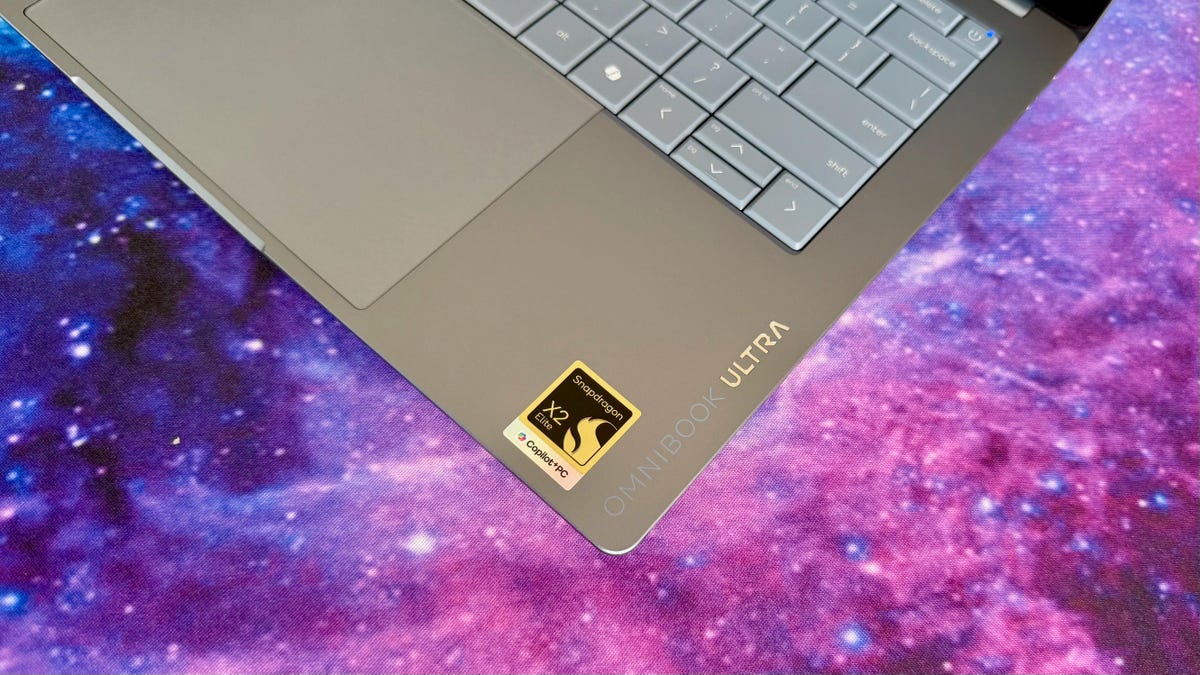
Ironically, all Qualcomm models come in an Intel Blue hue that HP calls stone blue. It’s a pleasing shade of grayish light blue.
Like the MacBook Neo, the keyboard is color-matched to the OmniBook Ultra 14’s chassis to present a unique, unified design ID that’s a break from the typical black keyboard against a gray or silver enclosure. And its all-aluminum body has the rigid, premium feel of a MacBook’s.
Like the Dell XPS 14, the OmniBook Ultra 14 is a compact 14-inch Windows laptop. The display bezels are razor-thin, and there’s little space wasted around the keyboard and touchpad. This is about as snug as a 14-inch laptop gets. The OmniBook Ultra 14 weighs just 2.8 pounds, which is a third of a pound lighter than the 3.2-pound XPS 14. It’s also appreciably lighter than the 14-inch MacBook Pro, which weighs 3.5 pounds. In fact, it’s nearly as light as the MacBook Air, which weighs 2.7 pounds but has a slightly smaller 13.6-inch display.
The OmniBook Ultra 14 has a slightly larger footprint than the compact XPS 14, measuring 12.3 inches wide by 8.5 inches deep. But both are exceptionally thin at roughly half an inch thick, and the OmniBook Ultra 14 looks even thinner than it really is, thanks to the front and sides of the laptop that slope gently away from the side edges.
HP seems proud of the thin edges that surround the OmniBook Ultra 14 and polished them up to show them off. The shiny edges are supremely thin and catch your eye, but I found that their polished finish scratches easily.
The thin-and-light design is enhanced by the concave platform on the bottom panel that lifts the laptop off of your desk or table, giving the OmniBook Ultra 14 the illusion of floating above whatever surface on which it’s resting. The concave shape also makes it incredibly comfortable to carry, which I first noticed on HP’s OmniBook 3 16. The gently sloped rubber foot on either end of this concave platform is angled perfectly to provide a comfortable grip below your fingertips when picking up the laptop.
Less comfortable are the sharp, squared-off edges on every side of the laptop. On a MacBook, for example, the top of the side edges is squared off, but the bottom of these side edges is rounded. On the OmniBook Ultra 14, both the top and bottom of the side edges are squared off. This makes carrying the laptop a bit uncomfortable because the bottom edge digs into your hand. The same thing happens when using the laptop on your lap; the bottom edge along the rear of the laptop digs into your thigh.
Despite the OmniBook Ultra 14’s trim dimensions, the keyboard is excellent. After using the laptop for the better part of the past two weeks, it has become one of my favorite laptop keyboards. It has a latticeless design (no spacing between the keys) like the Dell XPS 14’s, but I like the HP’s keyboard more because the keys are sculpted to give the illusion of having a little distance between each key. And the keys offer a stable feel and handle off-center strikes well. The keys also have surprisingly deep travel for such a thin laptop, but typing doesn’t feel mushy. The key response is lush yet lively. It’s also one of the quietest laptop keyboards I’ve used.
The touchpad runs directly from the bottom edge of the keyboard to nearly the bottom edge of the laptop, giving it as generous of proportions as the compact OmniBook Ultra 14 allows. I like its large size and enjoy its consistent and customizable haptic feedback. Both keyboard and touchpad are top-notch.
The 3K OLED display offers touch support and a variable refresh rate. Colors are bright and vibrant, and the contrast is fantastic with the OLED’s ability to deliver effectively zero-nit black levels. It’s rated for 500 nits of brightness, but my measurements come up short of that figure. It hit a peak of 462 nits on my tests with a Spyder X Elite colorimeter, which is still plenty bright for an OLED with such deep black levels.
The quad speakers produce decent sound for a laptop. Dialogue and effects sounded clear with Netflix shows, and sounds from the field and crowd noise when I watched World Cup games also had more punch than the average laptop’s audio output.
The 5-megapixel webcam captures crisp 1440p video with accurate color, and it’s an IR cam that you can use with Windows Hello for secure, face-recognition logins. The OmniBook Ultra 14 lacks a fingerprint reader, so the IR camera is the only option for logging in without needing to enter a password.
The OmniBook Ultra 14 lacks USB-A and HDMI ports, but you should be all set, even if you might need to use an adapter from time to time. The laptop offers three speedy USB-C 40Gbps ports — two on the left and one on the right — along with a headphone jack.
Should I buy the HP OmniBook Ultra 14?
If you like the idea of Apple’s MacBook Pro but want that premium design, strong overall performance and lengthy battery life in a Windows machine, the OmniBook Ultra 14 is the move I’d make. Choose the Snapdragon X2 model for better general performance and better battery life, or opt for the Intel Core Ultra system for better 3D graphics capabilities and no Windows-on-Arm compatibility worries. It’s nice to have both options in one great design.
You don’t necessarily need to spend the $3,000 or more on a loaded config like those that I tested. A still well-equipped system for closer to $2,000 will meet the needs of most people. Just be sure to track HP’s constantly fluctuating prices to catch it when it’s discounted by hundreds. I’ve seen it on sale for as much as $650 off to give you an idea of the type of discount you can expect to find.
The review process for laptops, desktops, tablets and other computerlike devices consists of two parts: performance testing under controlled conditions in the CNET Labs and extensive hands-on use by our expert reviewers. This includes evaluating a device’s aesthetics, ergonomics and features. A final review verdict is a combination of both objective and subjective judgments.
The list of benchmarking software we use changes over time as the devices we test evolve. The most important core tests we’re currently running on every compatible computer include Primate Labs Geekbench 6, Cinebench 2024, PCMark 10 and 3DMark Fire Strike Ultra.
A more detailed description of each benchmark and how we use it can be found on our How We Test Computers page.
Geekbench 6 CPU (multi-core)
HP OmniBook Ultra 14 (Qualcomm) 19685Lenovo Yoga Slim 7x Gen 11 19155Apple MacBook Pro 14 (M5, late 2025) 17946MSI Prestige 14 Flip AI Plus 16607HP OmniBook Ultra 14 (Intel) 16534Dell XPS 14 16197
Geekbench 6 CPU (single-core)
Apple MacBook Pro 14 (M5, late 2025) 4263HP OmniBook Ultra 14 (Qualcomm) 3956Lenovo Yoga Slim 7x Gen 11 3075HP OmniBook Ultra 14 (Intel) 3026MSI Prestige 14 Flip AI Plus 2896Dell XPS 14 2813
Cinebench 2024 CPU (multi-core)
Lenovo Yoga Slim 7x Gen 11 1285HP OmniBook Ultra 14 (Qualcomm) 1169Apple MacBook Pro 14 (M5, late 2025) 1118HP OmniBook Ultra 14 (Intel) 788Dell XPS 14 700MSI Prestige 14 Flip AI Plus 692
Cinebench 2024 CPU (single-core)
Apple MacBook Pro 14 (M5, late 2025) 199HP OmniBook Ultra 14 (Qualcomm) 158Lenovo Yoga Slim 7x Gen 11 149HP OmniBook Ultra 14 (Intel) 125Dell XPS 14 124MSI Prestige 14 Flip AI Plus 115
Geekbench AI (Neural engine quantized score)
HP OmniBook Ultra 14 (Qualcomm) 86246Lenovo Yoga Slim 7x Gen 11 77105Apple MacBook Pro 14 (M5, late 2025) 57528HP OmniBook Ultra 14 (Intel) 56687Dell XPS 14 55366MSI Prestige 14 Flip AI Plus 52450
3DMark Steel Nomad
MSI Prestige 14 Flip AI Plus 1527Dell XPS 14 1286HP OmniBook Ultra 14 (Intel) 1231Apple MacBook Pro 14 (M5, late 2025) 1129Lenovo Yoga Slim 7x Gen 11 994HP OmniBook Ultra 14 (Qualcomm) 947
Online streaming battery drain test
MSI Prestige 14 Flip AI Plus 25 hr, 18 minApple MacBook Pro 14 (M5, late 2025) 22 hr, 59 minLenovo Yoga Slim 7x Gen 11 22 hr, 10 minHP OmniBook Ultra 14 (Qualcomm) 19 hr, 34 minHP OmniBook Ultra 14 (Intel) 17 hr, 21 minDell XPS 14 14 hr, 42 min
System configurations
| HP OmniBook Ultra 14 (Qualcomm) | Microsoft Windows 11 Home; Qualcomm Snapdragon X2 Elite X2E-90-100; 64GB DDR5 RAM; Qualcomm Adreno X2-90 Graphics; 2TB SSD |
|---|---|
| HP OmniBook Ultra 14 (Intel) | Microsoft Windows 11 Home; Intel Core Ultra X9 388H; 64GB DDR5 RAM; Intel Arc B390 Graphics; 2TB SSD |
| Lenovo Yoga Slim 7x Gen 11 | Microsoft Windows 11 Home; Qualcomm Snapdragon X2 Elite X2E-88-100; 32GB DDR5 RAM; Qualcomm Adreno X2-90 Graphics; 1TB SSD |
| Dell XPS 14 | Microsoft Windows 11 Home; Intel Core Ultra X7 358H; 32GB DDR5 RAM; Intel Arc B390 Graphics; 1TB SSD |
| MSI Prestige 14 Flip AI Plus | Microsoft Windows 11 Home; Intel Core Ultra X7 358H; 32GB DDR5 RAM; Intel Arc B390 Graphics; 1TB SSD |
| Apple MacBook Pro 14 (M5, late 2025) | Apple MacOS Tahoe 26.0.1; Apple M5 (10-core CPU, 10-core GPU); 16GB LPDDR5; 1TB SSD |
Read the full article here